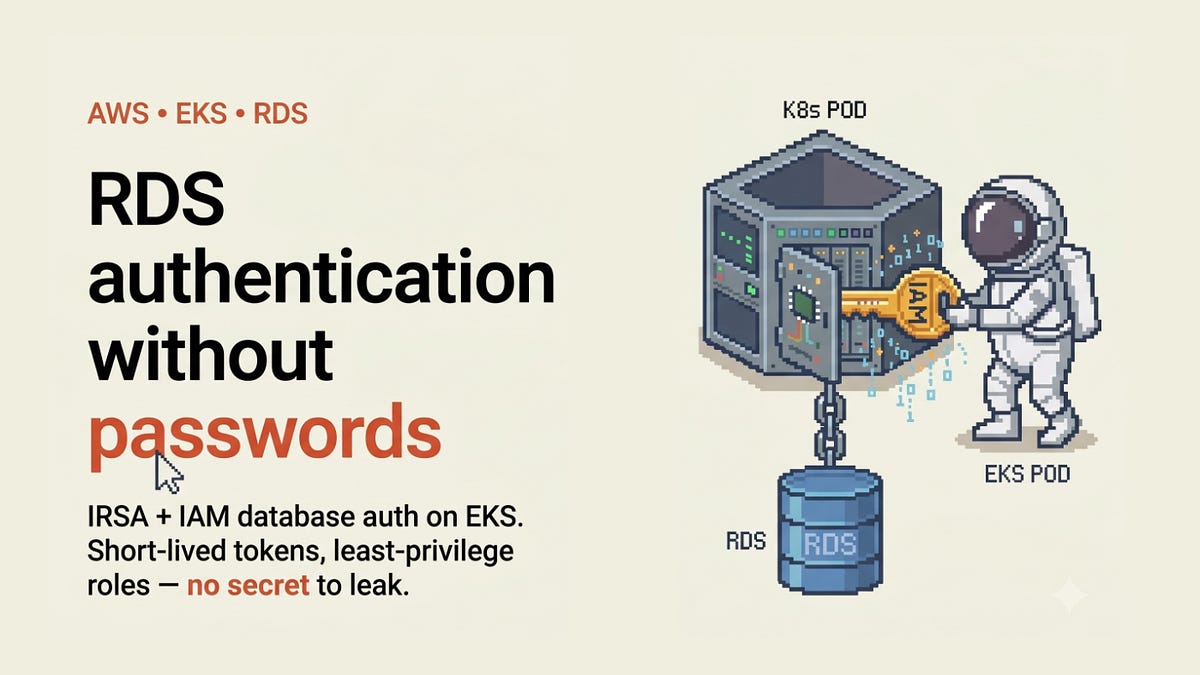
RDS Authentication without password
No more database passwords: connecting to RDS from EKS with IRSA and IAM authentication
or how a security certification made me delete the secret I was so proud of
For years my go-to answer for “how does the app get its database password?” was simple: inject it as a secret. Store it somewhere safe, mount it into the pod, done. It felt secure enough — the password wasn’t in the code, it wasn’t in git, it lived in a proper secret store. What else do you want?
Then I started studying for the Google Cloud Professional Cloud Security Engineer certificate, and one line in the material stopped me: injecting long-lived database credentials into workloads is no longer considered a good practice. Not “it’s fine but there’s something nicer” — actually not recommended anymore. But most of my current day-to-day work is on AWS, not GCP. So I did what I always do: I went to find out what the actual best practice looks like on AWS, and how to implement it for real.
This article is the result. By the end of it, you’ll understand why the classic “password-in-a-secret” model is weaker than it feels, and how to replace it on AWS with IRSA + RDS IAM authentication so that there is no database password anywhere — not in Secrets Manager, not in etcd, not in a pod’s environment.
Prerequisites — You have an EKS cluster with an OIDC provider enabled, an RDS PostgreSQL instance, and you deploy with something like Terraform. You’re comfortable with Kubernetes ServiceAccounts and basic IAM. I am not a security researcher; I’m an engineer who had to ship this, and I want to save you the hours I spent piecing it together.
The starting point — and why it’s weaker than it looks
Here’s the setup — and honestly the one I would have built myself a year ago.
RDS was created with an AWS-managed master password. A secrets operator read that password from Secrets Manager and rendered a Kubernetes Secret holding DB_HOST, DB_PORT, DB_USER, DB_PASS, DB_NAME. Every workload envFrom'd that secret and connected as the RDS master user.
It works. It’s tidy. And it has four problems that certification exam was quietly pointing at:
The credential is long-lived and copied everywhere. The password sits in Secrets Manager, then in etcd as a Kubernetes Secret, then in every pod’s environment. That’s three places a leak can happen instead of zero.
Everything is the superuser. Every service shares one over-privileged identity. No per-service revocation, no meaningful audit — every session in
pg_stat_activitylooks identical. Who ran that query? Yes.Rotation is disruptive. Rotating the master password means re-syncing the secret and restarting every consumer. So in practice, nobody rotates it.
The blast radius is the whole database. One leaked secret equals full database compromise, for every service and every environment.
The real anti-pattern here isn’t “we stored a password.” It’s credential sprawl combined with privilege concentration — one credential, copied to many places, that also happens to grant everything. Keep that framing in mind, because the AWS solution attacks both halves at once.
The two AWS pieces that make passwords unnecessary
Enter the two primitives you combine. Neither is new; the trick is using them together.
IRSA (IAM Roles for Service Accounts) is an EKS feature. Your cluster has an OIDC provider. You annotate a Kubernetes ServiceAccount with an IAM role ARN. When a pod using that SA starts, the EKS webhook injects a projected OIDC token and some AWS env vars, and the AWS SDK exchanges that token for temporary IAM credentials via sts:AssumeRoleWithWebIdentity. The result: the pod gets a real AWS identity with no stored AWS keys.
RDS IAM database authentication is an RDS feature. Instead of a password, the client presents a short-lived (~15 minute) auth token. The clever part: that token is a SigV4-signed string generated locally — minting it never calls RDS. RDS validates it against IAM at connection time. On the Postgres side you flip a login role into this mode with GRANT rds_iam TO <role>.
Combine them and you get the whole idea in one sentence: the pod uses its IRSA identity to sign an RDS auth token, and logs in as a dedicated least-privilege database role. No password anywhere.
Here’s the end-to-end flow:
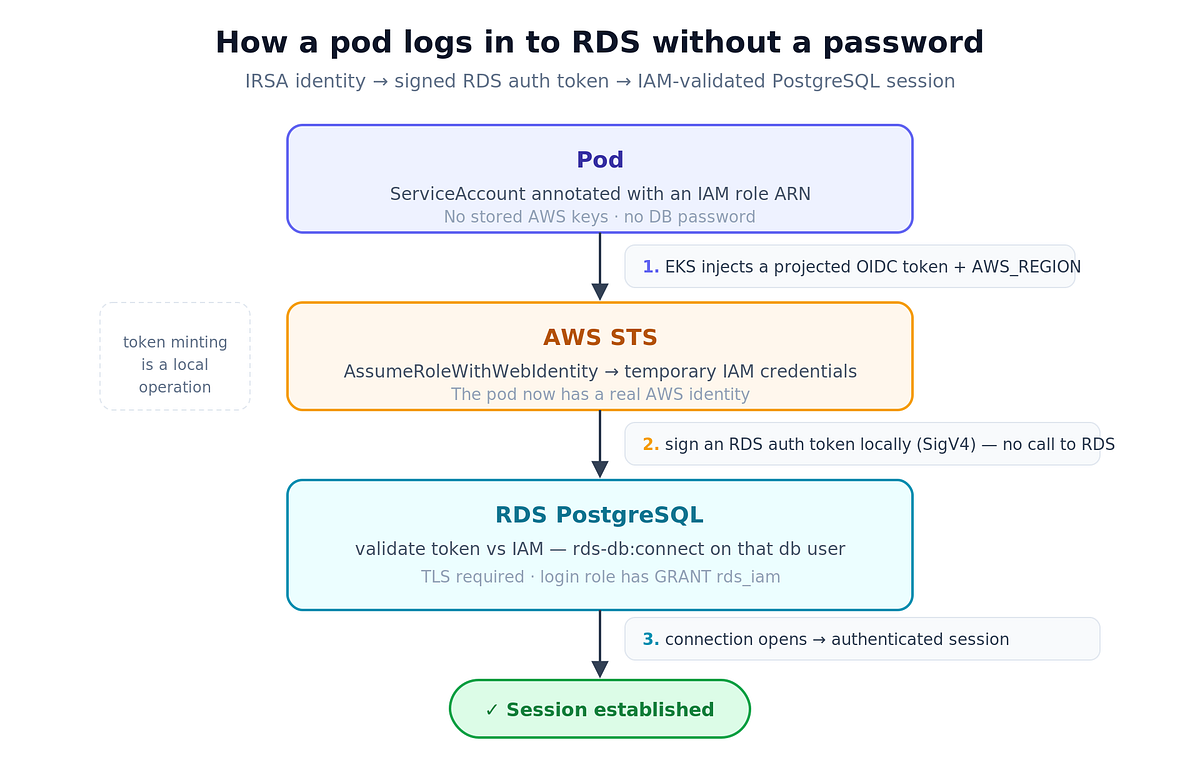
How a pod logs in to RDS without a password
Four facts from this flow shape every decision later, so I’ll call them out now:
Minting a token never contacts RDS. It’s a local signing operation, so a token-minting sidecar needs zero database connectivity.
RDS validates the token only when the connection opens. An established session happily survives past the 15-minute expiry. You only need a fresh token at connection-open time — so refreshing every ~10 minutes is plenty. No aggressive connection recycling.
IAM auth requires TLS. RDS rejects non-TLS IAM logins. It fails closed, which is exactly what you want.
The IAM policy resource ARN uses the DB resource id (
dbi-…), not the DB identifier. This one costs people an afternoon.
Step 1 — Enable IAM auth on RDS (non-disruptive)
The best part of the rollout: turning IAM auth on doesn’t break anything. It coexists with password auth. You flip one flag and both mechanisms work at the same time.
module "db" {
  source  = "terraform-aws-modules/rds/aws"
  engine  = "postgres"
  manage_master_user_password = true   # keep this during coexistence
  iam_database_authentication_enabled = true    # <-- the only RDS change here
  # rds.force_ssl stays 0 until every service is migrated, then flip to 1
}
That’s the entire infrastructure-level change to the database. Everything else is per-service.
Step 2 — One IAM role, one policy, one ServiceAccount per workload
This is the heart of the design, so let me state the principle bluntly: one dedicated Postgres login role + one IRSA role + one rds-db:connect permission per service, scoped to only that service's own DB user. No shared IAM-auth role. If you share the role, you've just reinvented the master-user problem with extra steps.
locals {
  db_iam_user = "app_authenticator"   # MUST match the DB role you create in step 4
}
# IAM role trusted by ONE specific service account.
# Note StringEquals, not StringLike - we pin the exact SA, no wildcards.
resource "aws_iam_role" "app_db" {
  name = "acme-app-db-iam-role"
  assume_role_policy = jsonencode({
    Version = "2012-10-17"
    Statement = [{
      Effect    = "Allow"
      Principal = { Federated = "arn:aws:iam::${local.account_id}:oidc-provider/${local.oidc}" }
      Action    = "sts:AssumeRoleWithWebIdentity"
      Condition = {
        StringEquals = {
          "${local.oidc}:aud" = "sts.amazonaws.com"
          "${local.oidc}:sub" = "system:serviceaccount:app-ns:app-sa"
        }
      }
    }]
  })
}
# Least privilege: exactly one action, on exactly one DB user.
resource "aws_iam_policy" "app_db" {
  name = "acme-app-db-iam-policy"
  policy = jsonencode({
    Version = "2012-10-17"
    Statement = [{
      Effect   = "Allow"
      Action   = "rds-db:connect"
      # resource id (dbi-...), NOT the db identifier
      Resource = "arn:aws:rds-db:${var.region}:${local.account_id}:dbuser:${module.db.db_instance_resource_id}/${local.db_iam_user}"
    }]
  })
}
resource "aws_iam_role_policy_attachment" "app_db" {
  role       = aws_iam_role.app_db.name
  policy_arn = aws_iam_policy.app_db.arn
}
resource "kubernetes_service_account" "app" {
  metadata {
    name        = "app-sa"
    namespace   = "app-ns"
    annotations = { "eks.amazonaws.com/role-arn" = aws_iam_role.app_db.arn }
  }
}
Step 3 — Move connection coordinates out of the Secret
Here’s the actual moment the leak surface disappears: you stop mounting a Secret with DB_USER/DB_PASS into the pod. Host, port and database name aren't secrets — they're network coordinates. So they belong in a plain ConfigMap.
resource "kubernetes_config_map" "app_db_config" {
  metadata { name = "app-db-config", namespace = "app-ns" }
  data = {
    DB_HOST = module.db.db_instance_address
    DB_PORT = tostring(module.db.db_instance_port)
    DB_NAME = module.db.db_instance_name
    DB_USER = local.db_iam_user   # the IAM login role, NOT the master user
  }
}
No password key. That’s the whole point.
Step 4 — Bootstrap the DB role (run once, before you apply)
Before Terraform applies, connect as the master user and create the login role that IAM will authenticate. This must exist before the infra is applied, and here’s the subtle reason why.
CREATE ROLE app_authenticator LOGIN;
GRANT rds_iam TO app_authenticator;   -- flips this role to IAM-token auth
-- then grant it exactly the privileges this service needs.
-- No password is ever set on this role.
The ordering constraint is the single biggest gotcha of the whole migration. The IAM policy and the DB role are two halves of the same identity living in different control planes — AWS on one side, Postgres on the other. If you apply the infra before the role exists, the pod authenticates fine to AWS and then Postgres rejects the login, and you’ll swear the IAM policy is wrong when it isn’t. So the rule is: bootstrap SQL → terraform apply → verify → next environment.
Step 5 — Get the token into the app
Now parithe interesting part: how does the token actually reach the database driver? There are two patterns, and which one you use depends on a single question — can your app sign a token itself?
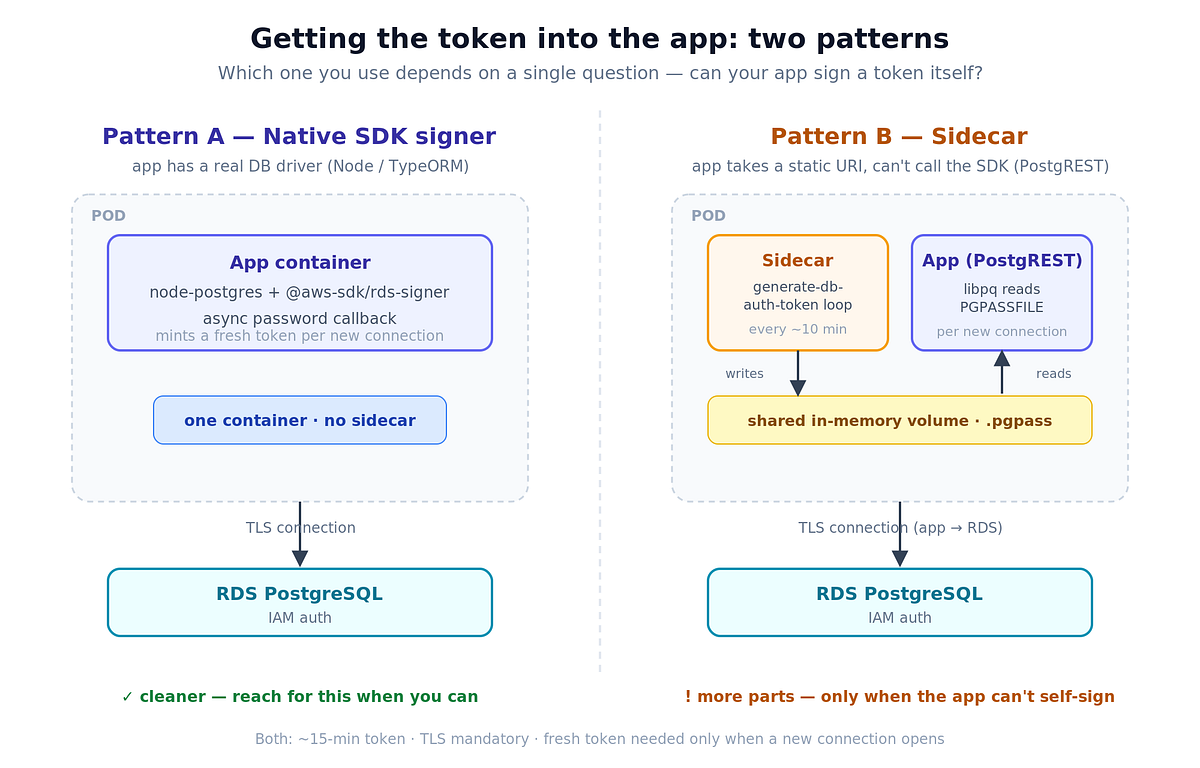
Comparison of 2 approaches to sign a token
Pattern A — Native SDK signer (the clean path)
If your app uses a real database driver — say node-postgres/TypeORM — it can mint the token itself. No sidecar, no extra containers. node-postgres accepts an async password callback that it calls for every new pooled connection, which is exactly where you want a fresh token.
import { Signer } from "@aws-sdk/rds-signer"
import { readFileSync, existsSync } from "fs"

// Auth mode is derived from the presence of DB_PASS - there is no USE_IAM flag.
//   DB_PASS set   -> static password (local / CI)
//   DB_PASS unset -> IAM auth via IRSA (dev / test / prod)
const useIam = () => !process.env.DB_PASS
export function buildDbPassword(): string | (() => Promise<string>) {
  if (!useIam()) return process.env.DB_PASS ?? ""
  const signer = new Signer({
    region:   process.env.AWS_REGION!,   // injected by the IRSA webhook
    hostname: process.env.DB_HOST!,
    port:     Number(process.env.DB_PORT),
    username: process.env.DB_USER!,       // the IAM login role
  })
  // Called by node-postgres per new connection → always a fresh ~15-min token.
  return () => signer.getAuthToken()
}
I want to call out the small trick in that code, because it’s my favourite part. There is no USE_IAM=true flag — omitting the password is the signal. Switching an environment to IAM auth becomes a config deletion, not a code change or a feature toggle. And it degrades gracefully to a plain password locally, where developers have no AWS identity. It mirrors exactly how the AWS SDK itself falls through its credential chain. Simple, and it just works.
Pattern B — Sidecar (for apps with a static connection string)
Some apps can’t call an AWS SDK. A good example is PostgREST: it takes a single PGRST_DB_URI at startup and that's that. For these you use a sidecar plus a nice property of libpq: it re-reads the PGPASSFILE on every new connection. So a sidecar can keep rotating the token in that file, and the app picks it up with zero reloads.
#!/bin/sh
# Mint an RDS IAM auth token into a libpq .pgpass file, then refresh forever.
# Region comes from AWS_REGION (injected by the EKS IRSA webhook). Resilient to
# transient aws failures: a failed mint is logged and retried, never fatal.
set -u
: "${DB_HOST:?}" "${DB_PORT:?}" "${DB_NAME:?}" "${DB_IAM_USER:?}"
PGPASS=/pgpass/.pgpass

write_token() {
  TOKEN="$(aws rds generate-db-auth-token \
    --hostname "$DB_HOST" --port "$DB_PORT" --username "$DB_IAM_USER")" || return 1
  # The token begins with "host:port/?Action=..." — escape backslash and
  # colon so libpq parses the final pgpass field correctly.
  ESCAPED="$(printf '%s' "$TOKEN" | sed -e 's/\\/\\\\/g' -e 's/:/\\:/g')"
  umask 077
  printf '%s:%s:%s:%s:%s\n' "$DB_HOST" "$DB_PORT" "$DB_NAME" "$DB_IAM_USER" "$ESCAPED" > "$PGPASS.tmp"
  mv "$PGPASS.tmp" "$PGPASS"
  chmod 600 "$PGPASS"
}

while true; do
  if write_token; then
    sleep "${REFRESH_INTERVAL_SECONDS:-600}"
  else
    echo "rds token refresh failed; retrying in ${RETRY_SECONDS:-15}s" >&2
    sleep "${RETRY_SECONDS:-15}"
  fi
done
# app container — note there is no password in the URI
PGPASSFILE=/pgpass/.pgpass
PGRST_DB_URI=postgresql://app_authenticator@$(DB_HOST):$(DB_PORT)/$(DB_NAME)?sslmode=requireA few things make the sidecar behave in production:
Run it as a native sidecar (
initContainerwithrestartPolicy: Always) so it starts first and lives for the pod's lifetime.Share a
emptyDirvolume withmedium: Memoryfor.pgpass— writable even when the app hasreadOnlyRootFilesystem: true.A
startupProbeon the sidecar gates the app until the first token is written, so there's no cold-start race.A
livenessProbethat checks the pgpass file's mtime is fresh — if refresh wedges, restart the sidecar before it silently goes stale.Both containers run as the same UID, so the
0600file the sidecar writes is readable by the app.
It works well, but be honest with yourself: the SDK path is much cleaner. Reach for the sidecar only when the app genuinely can’t self-sign.
One more thing — TLS
Both patterns need TLS, because IAM auth won’t work without it. Two levels:
sslmode=require— the channel is encrypted, but the server certificate isn't verified.sslmode=verify-full— also verifies the RDS server certificate. This needs the Amazon RDS CA bundle mounted into the pod (a ConfigMap works fine). This is the setting you want in production.
Rolling it out without a big-bang
The migration was incremental and reversible, which is the only responsible way to touch database auth.
IAM auth runs alongside password auth, so nothing breaks on day one. Leave the master secret and its ExternalSecret in place; migrated pods simply stop mounting it — meaning rollback is just re-adding the mount. Migrate one service at a time: pick something low-risk as a proof-of-concept (a thin REST proxy is a good candidate), then move the app services, then the ephemeral feature-branch environments. Only once everything is migrated do you “sundown”: delete the unused ExternalSecrets, set rds.force_ssl = 1, and trim master-secret access from the operator's IAM policy.
Advantages
No long-lived DB credential anywhere. The only credential is a ~15-minute token minted on demand.
Short-lived by construction. A leaked token is useless in 15 minutes, and it can’t be minted without the pod’s IAM identity.
Least privilege, per-service identity. Each workload has its own DB role and its own scoped
rds-db:connect. Revoke one service without touching the others.A real audit trail.
pg_stat_activityfinally shows distinct roles per service instead of everyone as master.No rotation process. Tokens are ephemeral — there is nothing to rotate.
TLS is enforced as a side effect. IAM auth won’t run without it.
Limitations (because nothing is free)
I’d be selling you something if I stopped at the upsides.
More moving parts. An IAM role, a policy, a ServiceAccount annotation, a ConfigMap and a DB bootstrap role per service — versus one shared secret. More Terraform, more to reason about.
Two control planes must agree. The AWS identity and the Postgres role have to match on the exact username, and the role must exist before apply. Get the ordering wrong and logins fail in a confusing way.
Sidecar complexity for apps that can’t self-sign. Startup ordering, liveness-on-staleness, shared-volume permissions, same-UID — you inherit all of it.
The ~15-minute token lifetime is a hard constraint. You must mint per new connection (SDK) or keep a fresh token on disk (sidecar). Pools that open connections after refresh has stopped will fail — hence the liveness probe and per-connection callback.
RDS connection-rate limits. There’s an AWS cap on new IAM-authenticated connections per second. Fine with pooling; it can bite high-churn, no-pool workloads.
TLS becomes mandatory and local dev needs a fallback. Developers have no IRSA identity, so plain-password auth locally is a must — which the
DB_PASS-presence trick handles cleanly.
So does it make sense for a tiny side project with one service? Probably not — the shared secret is fine, and this is a lot of ceremony. For anything with multiple services, real environments, and a compliance story to tell? Absolutely yes.
Before vs after
Before After Credential Static master password ~15-min IAM token, minted on demand Where it lives Secrets Manager → K8s Secret → pod env Nowhere at rest Identity Shared master (superuser) Per-service least-privilege role Delivery Secrets operator IRSA (the pod’s own AWS identity) Rotation Manual, disruptive None (ephemeral) Audit All sessions identical Distinct role per service TLS Optional Mandatory Mounted object Secret (DB_USER+DB_PASS) ConfigMap (host/port/db/user only)
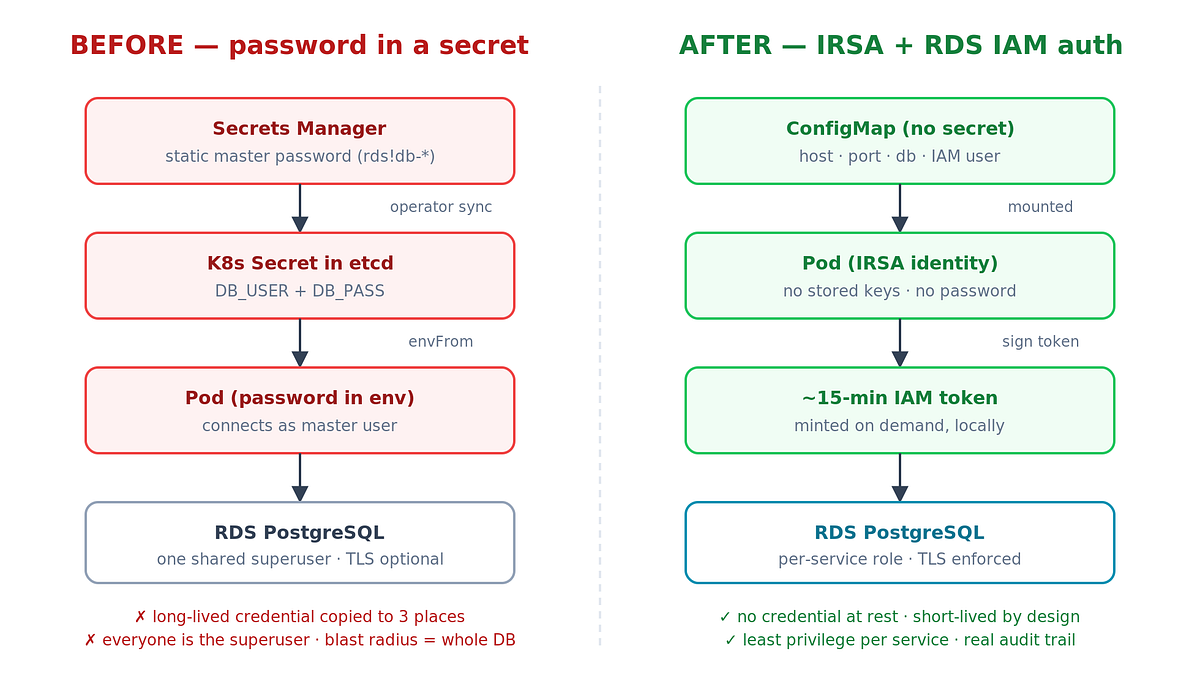
Architecture before vs after
And the same idea back on GCP
Since a GCP certificate sent me down this path, it’s only fair to close the loop. The good news: the exact same pattern exists on Google Cloud, just with different names. The keyless identity piece is Workload Identity Federation for GKE, which maps a Kubernetes ServiceAccount to a Google service account (or IAM principal) with no service-account key files to store or leak — the direct analogue of IRSA. The database piece is Cloud SQL IAM database authentication, which maps IAM principals to database logins so the workload authenticates with a short-lived IAM token instead of a stored password, exactly like RDS IAM auth. In practice you often run the Cloud SQL Auth Proxy as a sidecar with automatic IAM authentication — conceptually the same shape as the token-minting sidecar above. So whichever cloud you’re on, the modern answer to “how does the app get its database password?” is the same: it doesn’t get one.
Wrapping up
I went into this thinking I’d add one more secret to my secret store. I came out having deleted one — and ending up with per-service identities, real audit, no rotation, and enforced TLS almost for free. Not bad for a change whose headline feature is “there is no password.”
And that’s it! No password in Secrets Manager, none in etcd, none in a pod’s environment — just a short-lived token the pod signs for itself. If you’ve been injecting DB credentials as secrets like I was, this is the upgrade worth making.