I was implementing data encryption for our project, and that was the first time I worked with AWS KMS. I obviously struggled, googled, struggled again, googled again, and so on. In the end, it wasn’t complicated, but I spent a couple of hours.
My main problem was understanding how to generate the Key Material, which wasn’t completely clear to me from AWS documentation, which I will describe step by step.
So I am sharing here a simple setup and a repo, which might save those hours for someone.
Data encryption and KMS
Instead of explaining what KMS serves and what is the difference between the Customer Master Key and AWS Managed Key, I link here a video, which summarizes it very well.
[prerequisites] — You have an AWS account with all permissions needed and you know how to use Terraform.
First step — Terraform configuration
The simplest way to configure KMS CMK in the terraform is via the official AWS module. This provides all the necessary options to create a new KMS resource:
module "kms" {
  source = "terraform-aws-modules/kms/aws"
  version = "1.3.0"

  description         = "KMS key for encrypted bucket"
  enable_key_rotation = false
  create_external     = true
  key_usage           = "ENCRYPT_DECRYPT"

  # assign users to manage and use the key
  key_owners         = []
  key_administrators = []
  key_users          = []

  # each key can have multiple aliases with different permissions
  aliases                 = []
  aliases_use_name_prefix = true

  # assign grants to AWS resource to use this Key
  grants = {
    # keep reading
  }
}
I created a simple example repository, where I test this implementation.
S3 Buckets
In the repo, you will find 2 definition files (bucket-encrypted.tf and bucket-unencrypted.tf) for creating 2 S3 buckets. One of them is encrypted with the KMS and the other one stays unencrypted.
# Encrypted S3 bucket
resource "aws_s3_bucket" "s3_encrypted" {
  bucket = "pk-test-encrypted-bucket"
  acl    = "private"

  # configuration of the encryption
  server_side_encryption_configuration {
    rule {
      apply_server_side_encryption_by_default {
        # coming from the module kms definition in the kms.tf
        kms_master_key_id = module.kms.key_arn
        sse_algorithm     = "aws:kms"
      }
    }
  }
}

# Unencrypted S3 bucket
resource "aws_s3_bucket" "s3_unencrypted" {
  bucket = "pk-test-not-encrypted-bucket"
  acl    = "private"
}
AWS Lambda Function
Then I have 2 Lambda functions (lambda-encrypted.tf and lambda-unencrypted.tf), and each of them reads a testing file (a simple hello world txt file) from both of these buckets and outputs it via printf command or throws an error.
When creating a lambda function, we need to define and create also an IAM Role, used by this function.
Lambda functions — both of them have a similar definition, only the names changes.
# Lambda which has grant to use KMS encryption key
resource "aws_lambda_function" "lambda_encrypted" {
  function_name    = "read-s3-encrypted"
  role             = aws_iam_role.iam_lambda_encrypted.arn
  handler          = "index.handler"
  filename         = data.archive_file.lambda_zip.output_path
  source_code_hash = data.archive_file.lambda_zip.output_base64sha256
  runtime          = "python3.9"

  environment {
    variables = {
      S3_ENCRYPTED_BUCKET = aws_s3_bucket.s3_encrypted.id
      S3_UNENCRYPTED_BUCKET = aws_s3_bucket.s3_unencrypted.id
    }
  }
}

# Lambda which has NOT grant to use KMS encryption key
resource "aws_lambda_function" "lambda_unencrypted" {
  function_name    = "read-s3-unencrypted"
  role             = aws_iam_role.iam_lambda_unencrypted.arn
  handler          = "index.handler"
  filename         = data.archive_file.lambda_zip.output_path
  source_code_hash = data.archive_file.lambda_zip.output_base64sha256

  runtime = "python3.9"

  environment {
    variables = {
      S3_ENCRYPTED_BUCKET = aws_s3_bucket.s3_encrypted.id
      S3_UNENCRYPTED_BUCKET = aws_s3_bucket.s3_unencrypted.id
    }
  }
}
Lambda IAM role definition — in both cases the definition is the same.
# IAM Role for the encrypted Lambda
resource "aws_iam_role" "iam_lambda_encrypted" {
  name = "pk-test-lambda-encrypted"

  managed_policy_arns = [
    aws_iam_policy.lambda_s3_policy.arn,
  ]

  assume_role_policy = <<EOF
{
  "Version": "2012-10-17",
  "Statement": [
    {
      "Action": "sts:AssumeRole",
      "Principal": {
        "Service": "lambda.amazonaws.com"
      },
      "Effect": "Allow",
      "Sid": ""
    }
  ]
}
EOF
}

# IAM Role for the unencrypted Lambda
resource "aws_iam_role" "iam_lambda_unencrypted" {
  name = "pk-test-lambda-unencrypted"

  managed_policy_arns = [
    aws_iam_policy.lambda_s3_policy.arn,
  ]

  assume_role_policy = <<EOF
{
  "Version": "2012-10-17",
  "Statement": [
    {
      "Action": "sts:AssumeRole",
      "Principal": {
        "Service": "lambda.amazonaws.com"
      },
      "Effect": "Allow",
      "Sid": ""
    }
  ]
}
EOF
}
Python app for our Lambdas
index.py — a simple function to read the file from the bucket and print the content
import json
import boto3
from pprint import pprint
import os


s3_client = boto3.client("s3")
# environment variables of lambda functions
s3_enrypted_bucket = os.environ["S3_ENCRYPTED_BUCKET"]
s3_unencrypted_bucket = os.environ["S3_UNENCRYPTED_BUCKET"]
s3_prefix = ""
s3_file_key = "test.txt"

def handler(event, context):

    try:
        file_content = s3_client.get_object(Bucket=s3_unencrypted_bucket, Key=s3_file_key)["Body"].read()
        print("content of the unencrypted file:")
        print(file_content)
    except Exception as e:
        print("Error: {}".format(e))

    try:
        file_content = s3_client.get_object(Bucket=s3_enrypted_bucket, Key=s3_file_key)["Body"].read()
        print("content of the encrypted file:")
        print(file_content)
    except Exception as e:
        print("Error: {}".format(e))
AWS Policies for Lambda
Both Lambda functions have the same policies (lambda-policies.tf), which contain — s3:GetObject for both of our buckets.
resource "aws_iam_policy" "lambda_s3_policy" {
  name        = "pk-test-lambda-s3-policy"
  path        = "/"
  description = "Access to s3 buckets"

  policy = jsonencode({
    "Version" : "2012-10-17",
    "Statement" : [
      {
        "Sid" : "VisualEditor0",
        "Effect" : "Allow",
        "Action" : [
          "s3:GetObject",
        ],
        "Resource" : [
          "${aws_s3_bucket.s3_encrypted.arn}",
          "${aws_s3_bucket.s3_encrypted.arn}/*",
          "${aws_s3_bucket.s3_unencrypted.arn}",
          "${aws_s3_bucket.s3_unencrypted.arn}/*",
        ]
      }
    ]
  })
}
KMS Grants
To assign a grant for the Encrypted Lambda function, it needs to be defined in the KMS module grants block. However, we don’t use the ARN of the Lambda function, we need to use the ARN of its role — iam_lambda_encrypted. The same would go for the ie. EKS or other AWS services.
module "kms" {
  source = "terraform-aws-modules/kms/aws"
  # file defined previously
  ...

  # assign grants to AWS resource to use this Key
  grants = {
    lambda_doc_convert = {
      # ARN of the role of the lambda function
      grantee_principal = aws_iam_role.iam_lambda_encrypted.arn
      operations        = ["Encrypt", "Decrypt", "GenerateDataKey"]
    }
  }
}
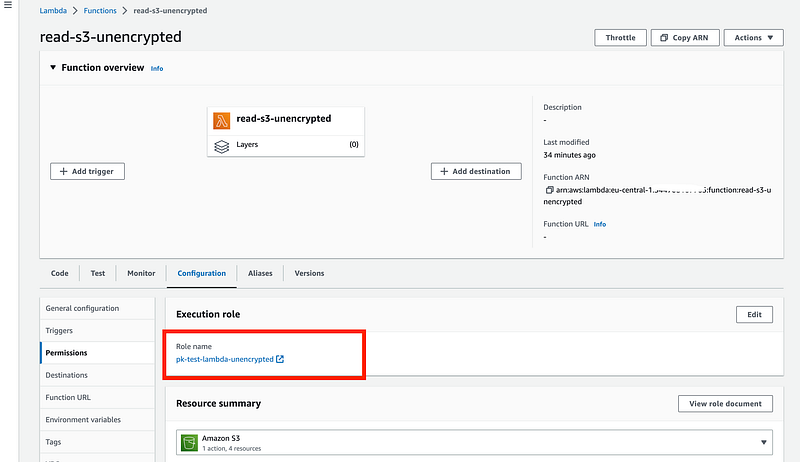
In the case you are hard-coding this value, you can find it in the AWS Console. You find it in the configurations of the Lambda functions — tab Permissions.
Terraform apply
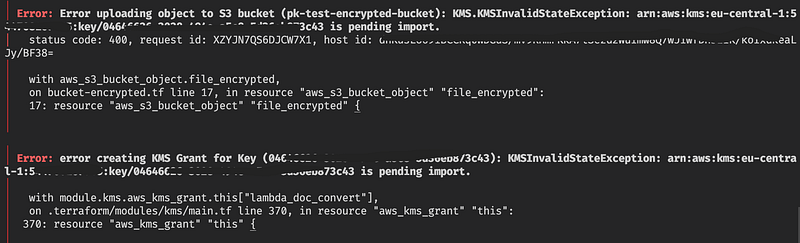
If you try to terraform apply with the code I provide in the repository (after changing the names of buckets and verifying if it doesn’t contain a malicious code), you will get the following error:
Error while applying
If you have only these two errors, it means it was a success! :)
The only problem here is, that we trying to grant permissions to a key, which does not exist yet — we created it, but we need to upload it, it is still in pending import status. This needs to be done as a manual action.
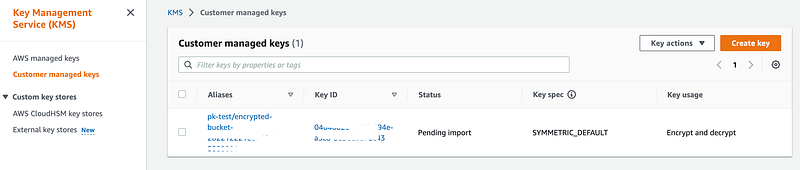
1. Go to AWS Console — Key Management Service and open the tab Customer Managed Keys. You will that you have your key created, but with the status saying Pending Import.
2. Open the key detail and in the tab Key Material we are going to download the Wrapping key and import token, they serve for creating our Key Material. Select the RSAES_OAEP_SHA_256 which is recommended by the official documentation.
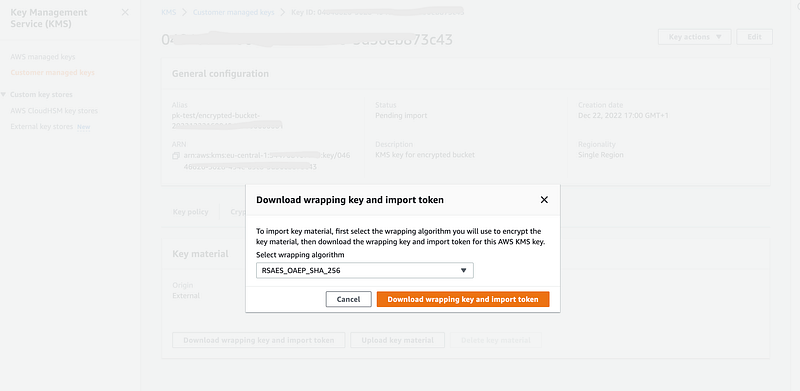
Downloading the Wrapping key and Import token
3. In your computer, you unzip the downloaded archive, which contains a Readme file, wrappingKey_ file which serves as a public key, and the importToken_ which is needed later for uploading.
Steps 4. and 5. follows AWS docs, which wasn’t completely clear to me on the first time.
4. We can generate Key material using OpenSSL, first we need to generate a random private key — this creates a file PlaintextKeyMaterial.bin
openssl rand -out PlaintextKeyMaterial.bin 325. And then, by calling the openssl pkeyutl command, we generate our Material Key:
openssl pkeyutl \
-in PlaintextKeyMaterial.bin \
-out EncryptedKeyMaterial.bin \
-inkey NAME_OF_THE_WRAPPING_KEY_FILE \
-keyform DER \
-pubin \
-encrypt \
-pkeyopt rsa_padding_mode:oaep \
-pkeyopt rsa_oaep_md:sha256
But this does not work on my MacOS. It throws me an error unable to load Private Key.
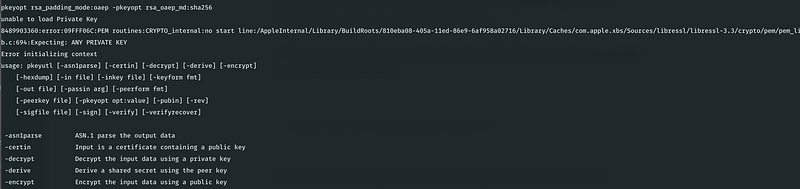
MacOS error when generating Material Key
The only solution I found was to run it inside a Docker container — a simple Alpine image:
docker run -it -v $PWD:/app alpine sh# install OpenSSL package
$ apk add openssl
# inside the mounted-volume folder
$ cd /app
# same command for generating
$ openssl pkeyutl \
-in PlaintextKeyMaterial.bin \
-out EncryptedKeyMaterial.bin \
-inkey NAME_OF_THE_WRAPPING_KEY_FILE \
-keyform DER \
-pubin \
-encrypt \
-pkeyopt rsa_padding_mode:oaep \
-pkeyopt rsa_oaep_md:sha256You can quit the docker image, and in your folder, you have a new file EncryptedKeyMaterial.bin.
6. Upload the EncryptedKeyMaterial.bin and the importToken_ to the KMS
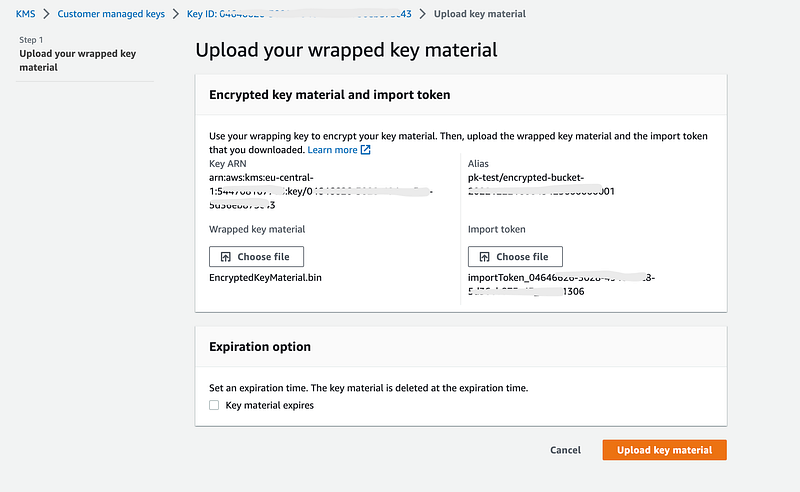
Uploading generated Material key
7. Re-apply terraform and the previous error is now gone.
And that’s it!
Now we can test if the encryption and grants work — open lambda functions on the tab test.
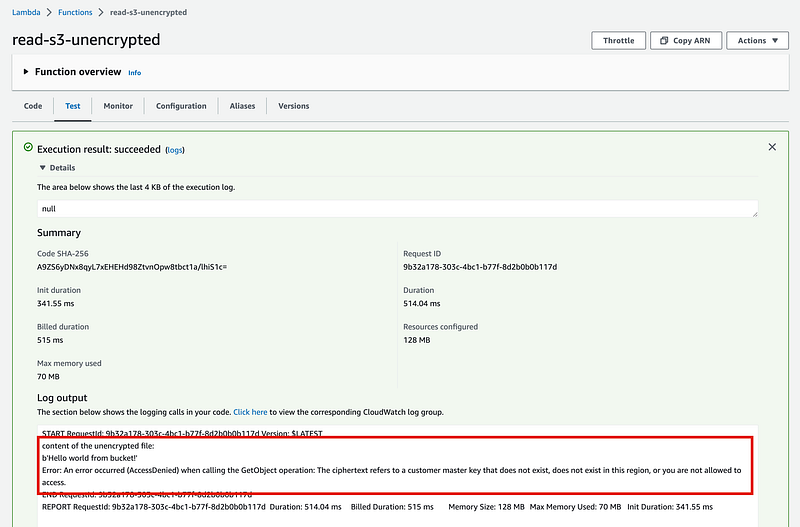
The unencrypted function gives us the following output — throwing an error when trying to read from the encrypted bucket.
Error: An error occurred (AccessDenied) when calling the GetObject operation: The ciphertext refers to a customer master key that does not exist, does not exist in this region, or you are not allowed to access.
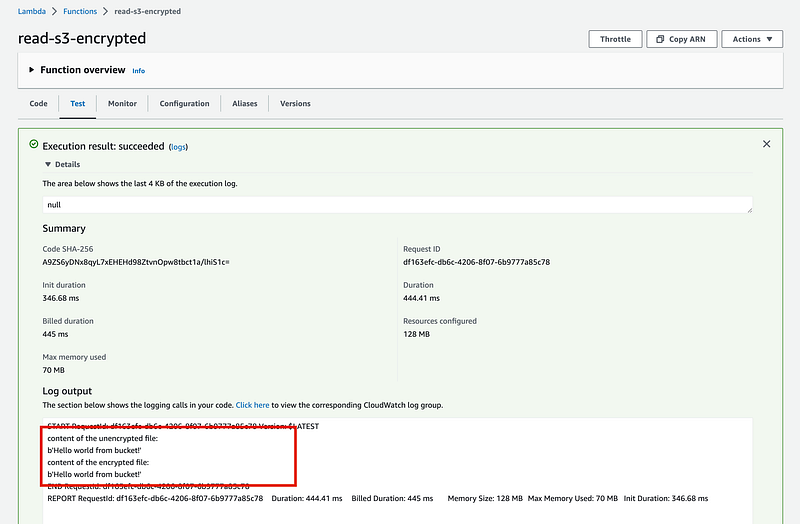
However, the other lambda function, which has grants for the KMS key, print also the content of the encrypted file.
GitHub - peterkracik/aws-cmk-test: Example of implementation CMK encryption for S3 bucket
You can't perform that action at this time. You signed in with another tab or window. You signed out in another tab or…github.com
disclaimer: I am not a security expert, I am a cloud architect and these were my first steps with the implementation of KMS, I just simply wanted to share a basic tutorial on how to generate the key and implement it via terraform.