Firebase is a really amazing tool, easy to implement in the code, easy to use, no back-end required. However if you came from the SQL world, it requires changes in the way you think and most-important in the way you construct your data store. And obviously I struggled with that and still do.
You don’t want to store your data to optimize them for the storage, you want them optimised for your request. In other words — when you send a request, the response should be already “pre-prepared” in the structure of your collections. You want to avoid any kind “join-like” relations thinking, where you construct the result from multiple tables. I try to think of firebase as the storage for json files where one request will return one (json) file in the ideal case.
These to videos explain really well the idea of structuring and propose great approaches to the structure
The solution I chose
In the apps I’ve created and used Firebase, I always had the same dilema for list pages — ie. list of users, list of posts, list of products etc.:
Should I really send request type of “Firebase get me all posts (users, products…) documents”?
Depends on the size of the app it could be 10, 20, 100, 1000 documents, so 10, 20, 100 or 1000 requests each time somebody goes to posts (products, products) lists page, which is probably more often then to the post (product, user) detail page. What could lead to reach free-limit but also to slow-down the whole app because of all data I’m receiving.
How NOT to get a $30k bill from Firebase
the secret is in the architecturemedium.com
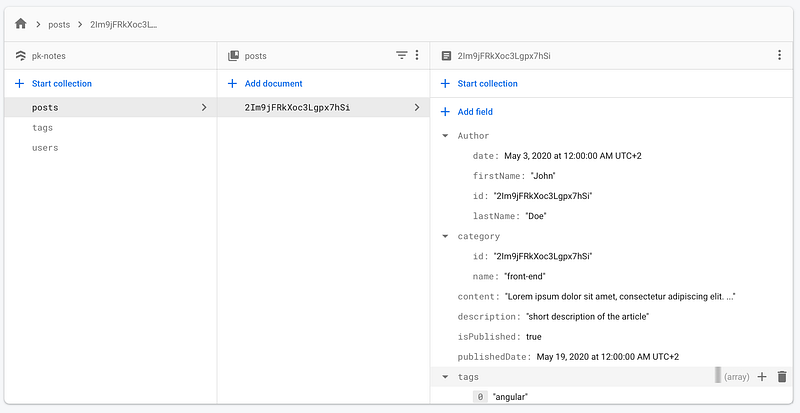
I decided to use the approach of “teasers”. In the list page I don’t need the full detail of a product, there are only few properties that are important in this view — id, title, category name, short description, thumbnail. That’s all, no need for all properties. So I’ve created a new collection, where I will generate a duplicate of those document but with only those fields I need on list pages.
From a full document like this:
I generate a “teaser” and store in the collection teasers in the document with id posts and a property which I named all. In this case I could have another property containing an array of posts for a category or another flag to group by:
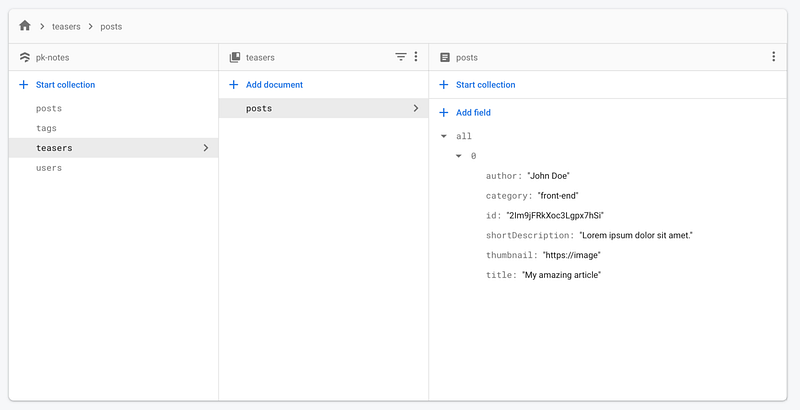
And now I would need request only one document to show the whole posts list page, no matter if we have 100 or thousand of posts.
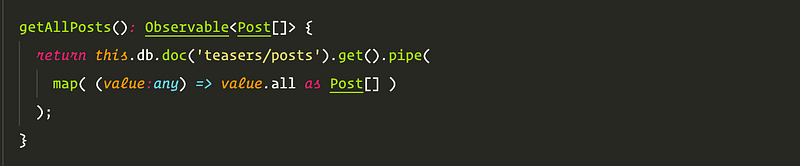
And this way we get them all
However there is size limit of the document, we would need more then 4000 posts (items in the array) similar to this one, to reach it.
Let’s materialise this idea
One option would be to call additional save request and store it to the teasers collection. Or we could leverage a cloud function.
1. Install firebase functions environment
https://firebase.google.com/docs/functions/get-started
2. Adding event listeners
We need to listen on 3 events on Posts document — onCreate, onUpdate, onDelete, which will trigger one of assigned function every time a new Post is created, existing updated or deleted and will pass snapshot and document id as parameters. .
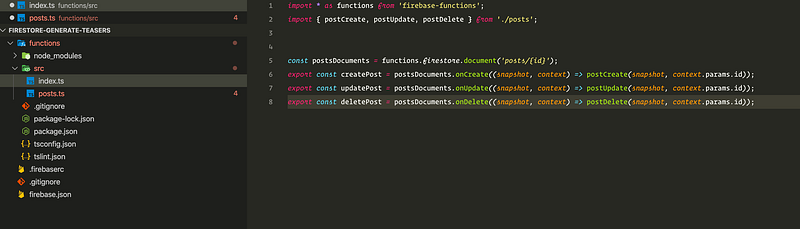
index.ts
3. triggered functions
Firstly I tried to do only one function triggered by onWrite event, but my code got quite messy and I decided to split it into 3 functions.
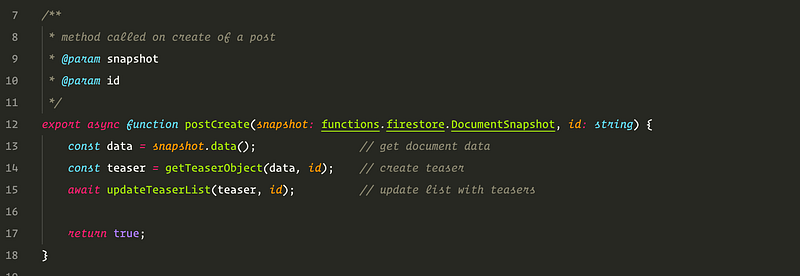
postCreate — function triggered when a new post is created, it will create a teaser object and insert it to the teasers posts document.
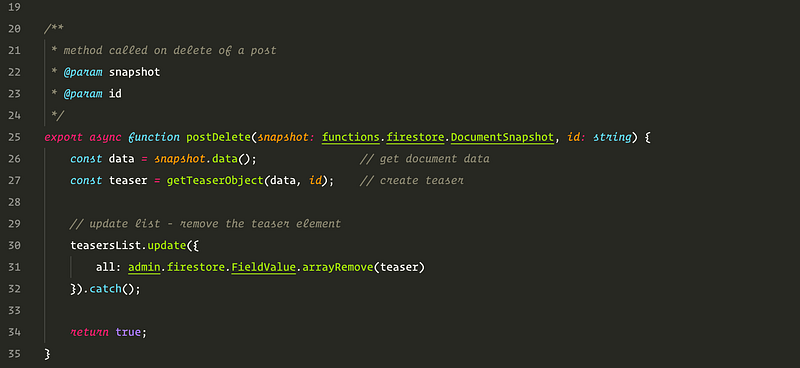
postDelete — function triggered once the post document is deleted, it will removed it from the teasers posts array
postUpdate — handles all updates of the post.
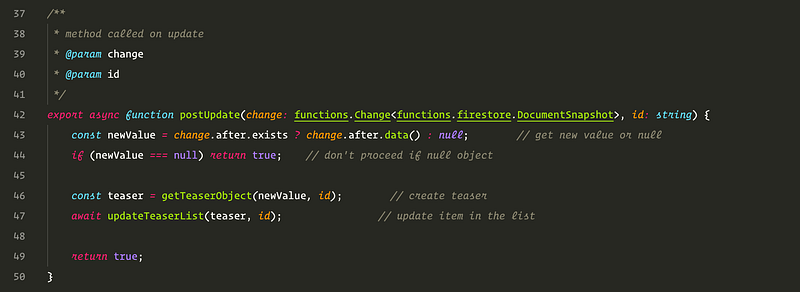
4. Generate our teaser object
We need to create a function, which will generate our teaser object from the original document, with only those properties we really need — to keep it as small as possible.
As parameter we pass our snapshot data — which is the post document and its id as a second parameter.
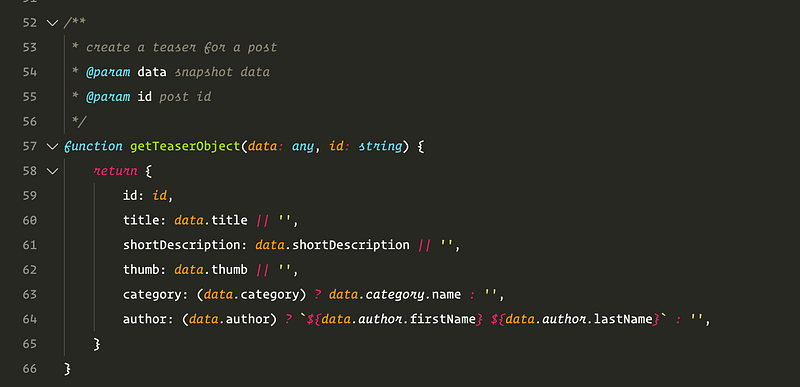
teaser object from the original document
5. Updating teaser list
The most important function is to update the array in the list. First we get our teasers/posts document, or we create it if it doesn’t exist. Then we check if the teaser is already in array and update or add it.
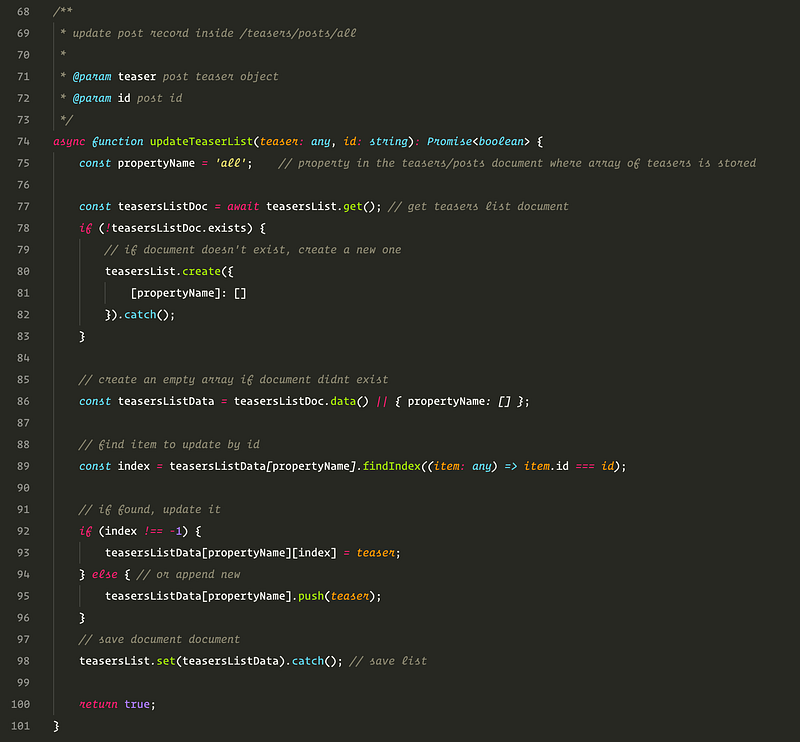
updating the teasers list
note:
We could improve it and reduce the amount of writes by comparing the old teaser with the new one, but it would also add more complexity as comparing objects in javascript is not simple.
In this case it would be quite easily, we could just simple convert old and new teaser to strings by JSON.parse(teaser) and compare them as texts. But problem arise when teaser contains inner objects what could be also date. So I’ve exchanged the number of writes for code optimisation.
And now just deploy functions and we’re ready, our posts will generate their teasers and it will be faster and more cost-effective to list them.
The whole source code of the example:
peterkracik/firebase-generate-teasers-list
Example firebase function to generate and update teasers list from documents, it will generate array of all Post…github.com